Vice City / Mody / Budynki
Standing Vice Point Interior
- HackMan128 | dodane przez HackMan128
- 02/15/2014
- 42691 Pobrania
Oceny:
Najpierw się zaloguj.
Ulubione:
Pobierz
1.00Mb
1.00Mb
Videos

Zaloguj się, żeby dodać film do tego moda.
Opis
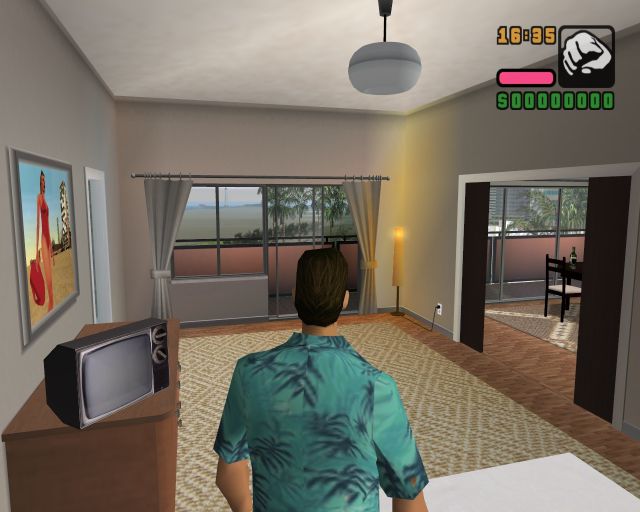
Interior for GTA Vice City in Standing Vice Point hotel.
Player can drink, smoke and save game state, but carefully with saving because it's beta, but anyway, it should work.
Player can drink, smoke and save game state, but carefully with saving because it's beta, but anyway, it should work.
Komentarze
Liczba dodanych komentarzy: 15.







06/11/2020 01:41
@Alejandro VC
like i wrote i cant remember much, but does your CLEO work?
have you tested with some other mods/scrips?
so if you have CLEO already installed
then
#drop the interiors.cs + gate.txt file inside (the Cleo folder).
#drop the gta_vc.dat file inside your data folder.
#drop the interiors folder from the download inside your maps folder.
DONT FORGET a BACKUP before replacing any files.
now start your IMG.Tool and open gta3 file inside your models folder of Vice city installation.
and add ALL the (4) files from the gta3img folder of your download.
(i dont think they are replacements, but you can search for the names before you add them, and if you find some just delet them before you add the new ones.
AFTER that you have to select all your files inside IMG.tool.
than click on REBUILD ARCHIVE. dont miss that part or it wont work.
and yeah maybe you missed the text file i forgot to mention idk.
after that you should be fine.
and if not i have no idea.
Cytuj | Odpowiedz | (0)
@Alejandro VC
like i wrote i cant remember much, but does your CLEO work?
have you tested with some other mods/scrips?
so if you have CLEO already installed
then
#drop the interiors.cs + gate.txt file inside (the Cleo folder).
#drop the gta_vc.dat file inside your data folder.
#drop the interiors folder from the download inside your maps folder.
DONT FORGET a BACKUP before replacing any files.
now start your IMG.Tool and open gta3 file inside your models folder of Vice city installation.
and add ALL the (4) files from the gta3img folder of your download.
(i dont think they are replacements, but you can search for the names before you add them, and if you find some just delet them before you add the new ones.
AFTER that you have to select all your files inside IMG.tool.
than click on REBUILD ARCHIVE. dont miss that part or it wont work.
and yeah maybe you missed the text file i forgot to mention idk.
after that you should be fine.
and if not i have no idea.
Cytuj | Odpowiedz | (0)


05/22/2018 01:00
@babaproo
i´ll try if i can remember but i am not 100% sure !!!
probably wrong.
1st get files from gta3img folder and replace it with image tool.
i hope you know how it works.
2nd put your interior folder inside gta vice / data/ maps
and replace it. ( make a copy before replacing it as a backup )
3rd interior.cs file must be in CLEO folder thats how i have it.
4th put CLEO.ASI in your main GTA V folder
more i cant remember
Cytuj | Odpowiedz | (0)
@babaproo
i´ll try if i can remember but i am not 100% sure !!!
probably wrong.
1st get files from gta3img folder and replace it with image tool.
i hope you know how it works.
2nd put your interior folder inside gta vice / data/ maps
and replace it. ( make a copy before replacing it as a backup )
3rd interior.cs file must be in CLEO folder thats how i have it.
4th put CLEO.ASI in your main GTA V folder
more i cant remember
Cytuj | Odpowiedz | (0)