San Andreas / Narzędzia / Narzędzia do dodawania nowych plików
SA Ped Manager
- Siraj ud-Daulah | dodane przez Siraj ud-Daulah
- 11/15/2026
- 93 Pobrania
Oceny:
Najpierw się zaloguj.
Ulubione:
121.57Kb
Odsetek antywirusów, które wykryły zagrożenie: 4.7619%
Zobacz raport skanowania antywirusowego
Filmy
Nie dodano jeszcze filmów.Zaloguj się, żeby dodać film do tego moda.
Opis
SA Ped Manager (GTA San Andreas Character & Skin Mod Manager)
=============================================================
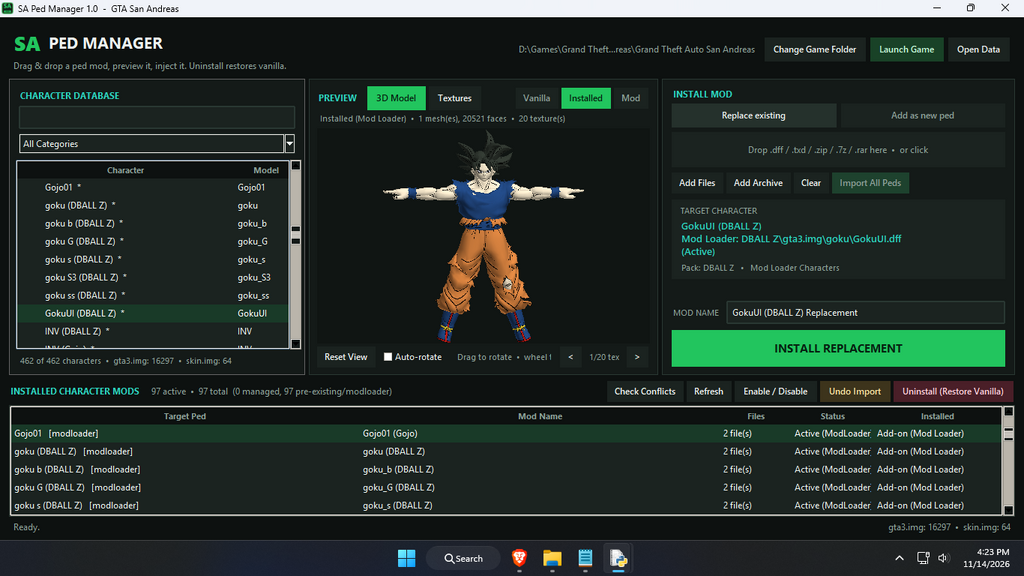
SA Ped Manager is a standalone desktop app for Grand Theft Auto: San Andreas (PC) that lets you preview, organize, install, and remove character and pedestrian mods without ever touching an external IMG editor. If you find any bug let me know in the comment.
WHAT IT CAN DO
--------------
- Live 3D & Texture Previews
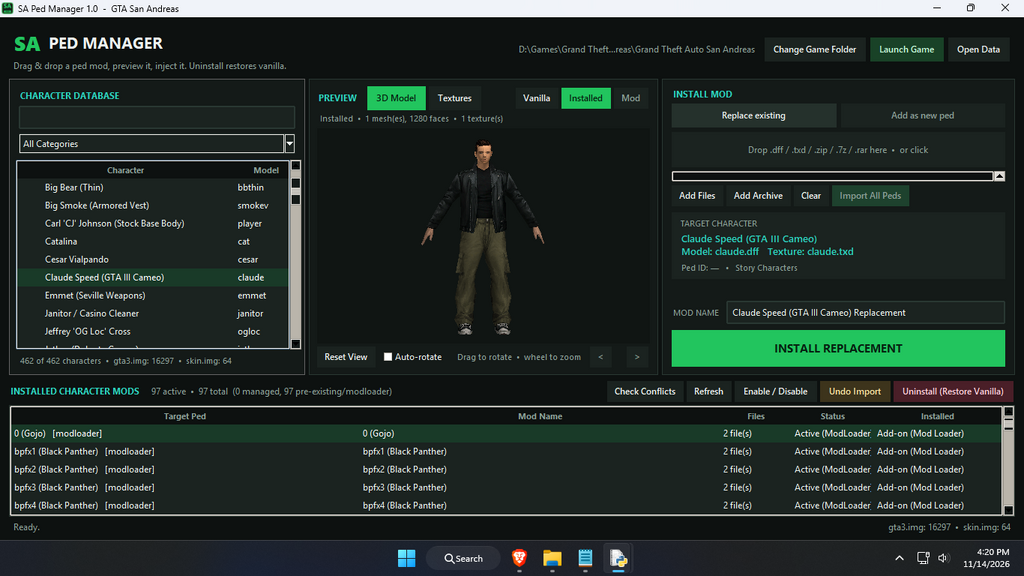
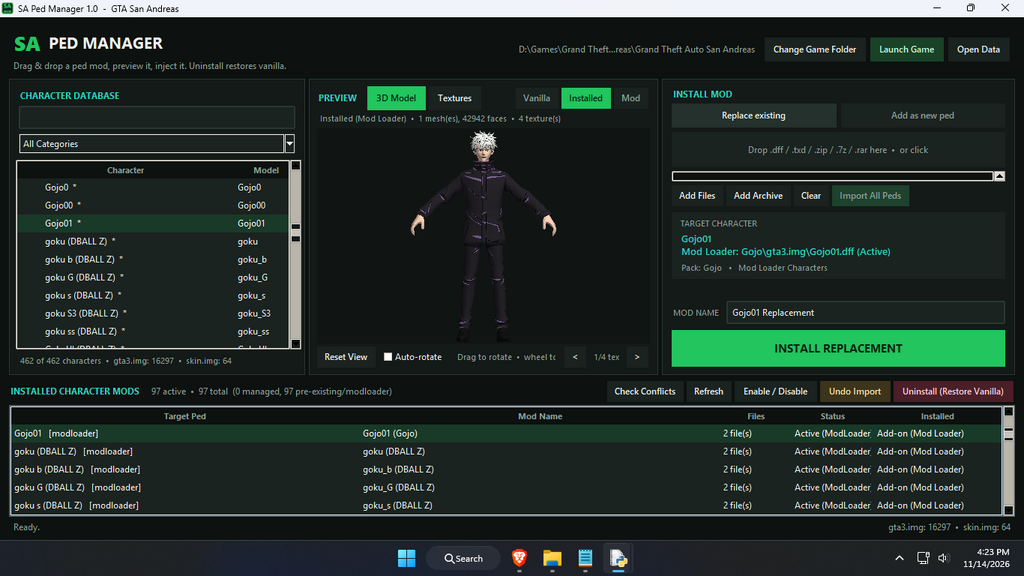
Compare the Vanilla, currently Installed (including active Mod Loader overrides), and new Mod models side-by-side. You can drag to rotate the 3D mesh, scroll to zoom, toggle auto-rotate, or jump over to the Textures tab to inspect every decoded .txd image and its dimensions.
- Full Character Database & Smart Filtering
The app automatically scans models\gta3.img, data\peds.ide, models\cutscene.img, CLEO\skin.img (if you have it), and any rigged characters sitting in modloader\. Everything is sorted into handy categories like Story & Protagonist, Gang Members, Strip Club & Nightlife, Mod Loader Characters, Cutscene Characters, CLEO Skin Selector (skin.img), and Added Characters.
- Flexible Installation & Batch Imports
> Replace Existing Ped: Swaps out a stock or cutscene character in gta3.img or cutscene.img while automatically saving a byte-exact backup of the original files.
> Add as New Ped: Drops an extra character straight into CLEO\skin.img (if installed) or an open peds.ide slot (with an option to let them spawn naturally on the streets via data\pedgrp.dat) so you don't have to overwrite any vanilla NPCs.
> Import All Peds: Drag in a folder or archive packed with multiple matching .dff and .txd pairs to batch-install the whole set in one click.
- Automatic Mod Loader Conflict Protection
If an active Mod Loader pack (like an ESRGAN texture upscale or model override) is shadowing your replaced .dff or .txd—which usually causes white, untextured characters in-game—the manager detects it and safely renames just the conflicting files to *.disabled. When you disable or uninstall your mod later, it restores them automatically.
- Detects Your Existing Mods
Anything you installed before using SA Ped Manager—whether it's an older gta3.img replacement, a CLEO\skin.img skin, or a Mod Loader character—shows up automatically under INSTALLED CHARACTER MODS so you can manage everything from one screen.
- Easy Organization & Sorting
> Drag & Drop Reordering: Grab any row in INSTALLED CHARACTER MODS and drag it up or down (the list auto-scrolls near the edges) to arrange things however you like (installed_order.json).
> Column Sorting: Click on the Target Ped, Mod Name, Files, Status, or Installed headers to sort alphabetically or group your mods by type (Add-on vs. Replace).
- Safe, One-Click Reversibility
> Undo Import: Steps backward through your most recent installs to restore whatever was in the archive beforehand.
> Enable / Disable: Temporarily switches a mod off (restoring vanilla files or renaming Mod Loader overrides to *.disabled) without deleting anything.
> Uninstall (Restore Vanilla): Wipes the mod completely and writes Rockstar's original files back into your archive.
WHAT YOU NEED
-------------
System & Game:
- Windows 10 or Windows 11 (64-bit)
- GTA San Andreas (PC) (models\gta3.img and data\peds.ide)
(Optional: Mod Loader in modloader\ and/or CLEO Skin Selector in CLEO\skin.img)
Python & Dependencies:
1. Python 3.9 or newer for Windows from https://www.python.org/downloads/
During setup, make sure "Add python.exe to PATH" and tcl/tk (checked by default) are selected.
2. Required Packages (open Command Prompt or PowerShell and run):
pip install pillow numpy tkinterdnd2
- pillow: handles TXD image decoding and UI icons.
- numpy: powers the fast software 3D mesh rasterizer.
- tkinterdnd2: enables drag-and-drop for files, archives, and list rows (the app still works fine via the Add Files / Add Archive buttons if you skip this).
3. Optional Archive Support (for dragging and dropping .7z or .rar files; .zip works out of the box):
pip install py7zr rarfile
Alternatively, just have 7-Zip (7z.exe) installed in C:\Program Files\7-Zip\ or your system PATH.
GETTING STARTED
---------------
1. Extract the SA_Ped_Manager_Release folder wherever you prefer—either inside your GTA San Andreas directory or somewhere separate like your Desktop or a Tools folder. Make sure to keep SA_Ped_Manager.exe, SA_Ped_Manager.pyw, and the Icons folder together in the same spot.
2. Double-click SA_Ped_Manager.exe to launch the app cleanly with no terminal or CMD window popping up.
3. On your first run, the manager will try to find your GTA San Andreas folder automatically. If you keep your game in a custom spot, click Change Game Folder and point it to your root game directory (where gta_sa.exe and models\gta3.img live).
4. Make sure GTA San Andreas is closed before installing, toggling, or uninstalling mods so the game isn't locking gta3.img.
HOW TO USE IT
-------------
1. Find a Character
Filter by category (All Categories, Strip Club & Nightlife, Gang Members, Mod Loader Characters, etc.) or type a name or model into the search bar on the left.
2. Load Your Mod
Drag and drop .dff / .txd files—or a .zip, .7z, or .rar archive—straight into the drop zone, or use the Add Files / Add Archive buttons.
3. Check the Preview
Click Mod in the center preview bar to look over the 3D model and textures, and flip between Installed and Vanilla to compare.
4. Install
Select Replace existing (which auto-matches the filename or targets whichever ped you clicked on the left) and hit INSTALL REPLACEMENT. Or choose Add as new ped, pick either CLEO skin.img or an Extra peds.ide slot, and click ADD AS NEW PED.
5. Keep Things Tidy
Click any column header in the bottom table (Target Ped, Installed, etc.) to sort by name or mod type, or drag rows directly into whatever order you want.
WHERE YOUR DATA & BACKUPS LIVE
------------------------------
Everything the app creates is stored right next to SA_Ped_Manager.exe inside SA_Ped_Manager_Data\:
- vanilla\ : Byte-exact backups of your original .dff and .txd files before they were ever replaced.
- installed\ : Individual mod manifests and stored files used when toggling mods on and off.
- config.json & installed_order.json : Your saved game path and custom table layout.
TROUBLESHOOTING
---------------
- My character is completely white in-game:
Go to INSTALLED CHARACTER MODS -> Check Conflicts to see if an active Mod Loader folder is overriding the texture. Also double-check that you loaded both the .dff and its matching .txd, and look for any warning text under MOD NAME (this will flag missing textures or multi-material export bugs in the downloaded .dff).
- Double-clicking SA_Ped_Manager.exe says Python wasn't found:
Install Python 3 from python.org with the Add to PATH box checked, then run: pip install pillow numpy tkinterdnd2
- My changes aren't showing up in-game:
Verify that gta_sa.exe was completely closed while you were installing the mod.
Komentarze
Liczba dodanych komentarzy: 0.