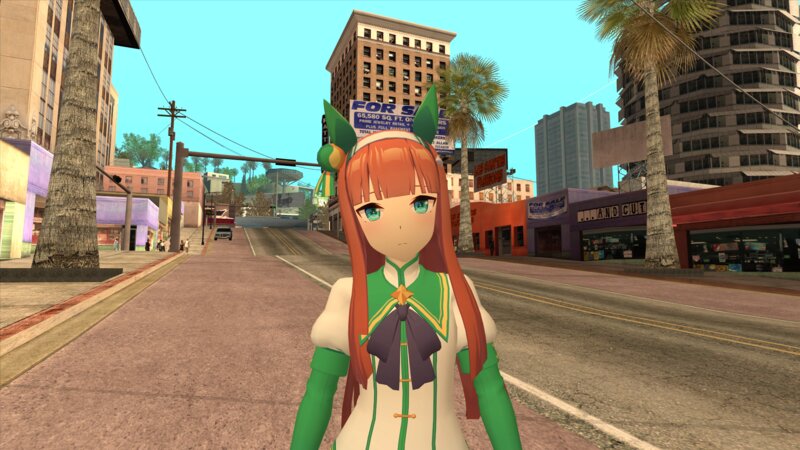
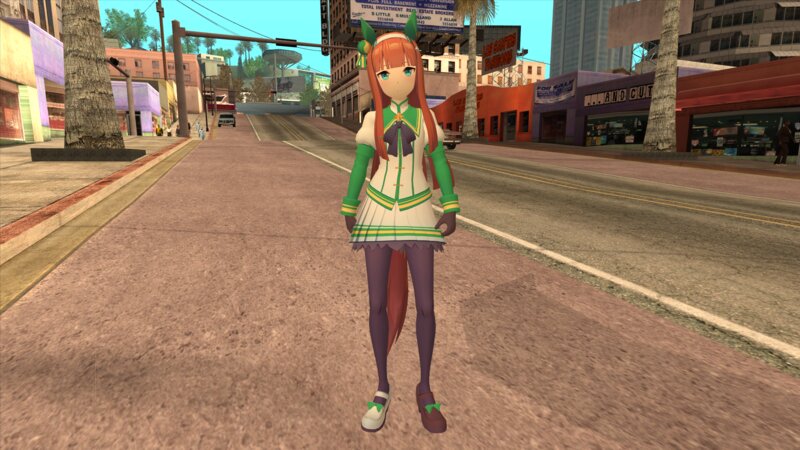
San Andreas / Skiny / Nowy wygląd / model
Silence Suzuka (Uma Musume)
- Fookie_00 | dodane przez Fookie_00
- 01/03/2026
- 2012 Pobrania
Oceny:
Najpierw się zaloguj.
Ulubione:
Pobierz
761.34Kb
Odsetek antywirusów, które wykryły zagrożenie: 0%
Zobacz raport skanowania antywirusowego
761.34Kb
Odsetek antywirusów, które wykryły zagrożenie: 0%
Zobacz raport skanowania antywirusowego
Filmy
Nie dodano jeszcze filmów.Zaloguj się, żeby dodać film do tego moda.
Komentarze
Liczba dodanych komentarzy: 6.





01/04/2026 10:21
@XG417 I am using a Blender plugin called BNPR Abnormal to smooth the normals on the face. If you're interested I'm leaving a link below that shows the method I use to achieve that.
https://bnpr.gitbook.io/bnpr/shaders/toon-shading-nbpr-abnormal-normal-sphering
Cytuj | Odpowiedz | (1)
@XG417 I am using a Blender plugin called BNPR Abnormal to smooth the normals on the face. If you're interested I'm leaving a link below that shows the method I use to achieve that.
https://bnpr.gitbook.io/bnpr/shaders/toon-shading-nbpr-abnormal-normal-sphering
Cytuj | Odpowiedz | (1)