San Andreas / Mody / Dźwięki
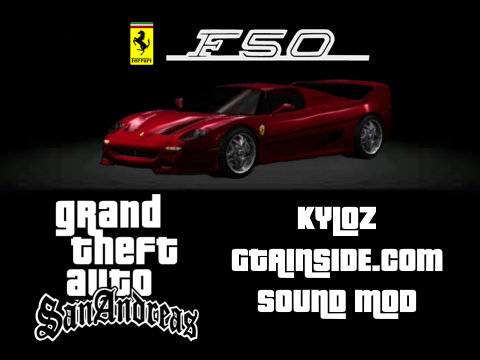
Need For Speed 2 Ferrari F50 Car Sound Mod
- kyloz | dodane przez kyloz
- 02/04/2021
- 3040 Pobrania
Oceny:
Najpierw się zaloguj.
Ulubione:
Pobierz
306.71Kb
Odsetek antywirusów, które wykryły zagrożenie: 0%
Zobacz raport skanowania antywirusowego
306.71Kb
Odsetek antywirusów, które wykryły zagrożenie: 0%
Zobacz raport skanowania antywirusowego
Filmy
Nie dodano jeszcze filmów.Zaloguj się, żeby dodać film do tego moda.
Opis
These are sounds of the Ferrari F50 from Need For Speed 2 which have been adapted to GTA SA by me. They replace Audio banks 096 and 097, which affect these cars:
Super GT
Cheetah
Comet
Turismo
Banshee
The sounds will not be completely identical to the sounds in Need For Speed 2, since that game handles audio differently and uses many more/different audio files at different pitches and ranges, but these sounds ARE still directly from Need For Speed 2.
If you enjoyed or liked this mod please rate 10 stars and add it to your favorites. Peace out!
Super GT
Cheetah
Comet
Turismo
Banshee
The sounds will not be completely identical to the sounds in Need For Speed 2, since that game handles audio differently and uses many more/different audio files at different pitches and ranges, but these sounds ARE still directly from Need For Speed 2.
If you enjoyed or liked this mod please rate 10 stars and add it to your favorites. Peace out!
Komentarze
Liczba dodanych komentarzy: 2.

07/29/2021 14:20
@Fardeen833 Start recording your PC audio with a program like Audacity through stereo mix, then play the game, and disable music so only the car noises can be heard, then pick the right camera angle (which also affects the loundness of the car sounds) and then simply record the audio. Then you just chop up the recorded audio, make sure that the clipped parts match the same length of time of the audio files you're replacing, and also try your best to remove the clicking sound when the audio file loops.
Cytuj | Odpowiedz | (0)
@Fardeen833 Start recording your PC audio with a program like Audacity through stereo mix, then play the game, and disable music so only the car noises can be heard, then pick the right camera angle (which also affects the loundness of the car sounds) and then simply record the audio. Then you just chop up the recorded audio, make sure that the clipped parts match the same length of time of the audio files you're replacing, and also try your best to remove the clicking sound when the audio file loops.
Cytuj | Odpowiedz | (0)

