San Andreas / Mody / Mody CLEO
In-game Timecyc Editor 1.5
- fastman92
- fastman92.tk
- 01/28/2012
- 11960 Pobrania
Oceny:
Najpierw się zaloguj.
Ulubione:
Pobierz
2.54Mb
2.54Mb
Videos

Zaloguj się, żeby dodać film do tego moda.
Opis
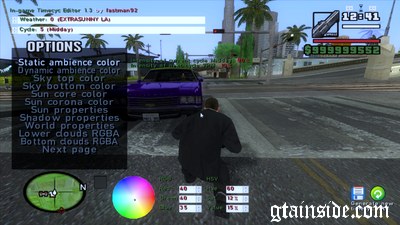
This tool, a CLEO script lets you edit timecyc.dat (weather color, properties) in game using a simple and intuitive UI.
Changes take effect immediately.
There are several other timecyc editors, but they they do not allow changes to be tested in real time and require the game to be restarted.
Or at least effects are not clearly visible until the game is maximized and timecyc.dat is reloaded again.
To select colors an HSV pallete with RGB & HSV spinners has been implemented.
Other spinners allow easy editing of other properties.
After editing the save button can be used to generate a new imecyc.dat file.
You`re encouraged create your own timecyc.dat and share it up to GTA community.
What`s more - the project is released under open source license terms.
Fully compatible with GTA San Andreas v1.0 [US] HOODLUM No-CD Fixed EXE & GTA: San Andreas v1.01 [EURO] No-CD/Fixed EXE
Fully compatible with any screen (4:3, 16:9, 16:10...)
Changes take effect immediately.
There are several other timecyc editors, but they they do not allow changes to be tested in real time and require the game to be restarted.
Or at least effects are not clearly visible until the game is maximized and timecyc.dat is reloaded again.
To select colors an HSV pallete with RGB & HSV spinners has been implemented.
Other spinners allow easy editing of other properties.
After editing the save button can be used to generate a new imecyc.dat file.
You`re encouraged create your own timecyc.dat and share it up to GTA community.
What`s more - the project is released under open source license terms.
Fully compatible with GTA San Andreas v1.0 [US] HOODLUM No-CD Fixed EXE & GTA: San Andreas v1.01 [EURO] No-CD/Fixed EXE
Fully compatible with any screen (4:3, 16:9, 16:10...)
Komentarze
Liczba dodanych komentarzy: 13.





02/01/2012 09:33
Junior_Djjr, what`s your CLEO version on game with a lot of mods? It should be CLEO4, reinstall it. Many people use CLEO3 for Ryosuke`s scripts, so i suspect you may use it too.
What happens when you have only opcode scripts, but remove TimecycEditor.cs? Does the game crash?
Cytuj | Odpowiedz | (0)
Junior_Djjr, what`s your CLEO version on game with a lot of mods? It should be CLEO4, reinstall it. Many people use CLEO3 for Ryosuke`s scripts, so i suspect you may use it too.
What happens when you have only opcode scripts, but remove TimecycEditor.cs? Does the game crash?
Cytuj | Odpowiedz | (0)
02/01/2012 07:23
incredible! *-*
good work! perfect man!
(but not worked for my game with lot of mods... only worked in game with a little quantity of mods... i not founded the problem... if i found, i communicate for you)
..yes, is the GTA San Andreas v1.0 [US] HOODLUM
..crashed after loaded a save game... in the time to start a game, and when i delete the OPCODE's .cs, the game enter, but no work...
Cytuj | Odpowiedz | (0)
incredible! *-*
good work! perfect man!
(but not worked for my game with lot of mods... only worked in game with a little quantity of mods... i not founded the problem... if i found, i communicate for you)
..yes, is the GTA San Andreas v1.0 [US] HOODLUM
..crashed after loaded a save game... in the time to start a game, and when i delete the OPCODE's .cs, the game enter, but no work...
Cytuj | Odpowiedz | (0)

01/29/2012 09:00
It`s all written in Readme.txt
** 1.5 version
- update caused by upcoming car spawner that uses camera rotation when player can`t move too.
Opcode 003E: overwrite_camera_movement_state 2 has been created to be shared along the scripts.
- default key of rotation was changed to slash
You can alter the key in TimecycEditor.ini
- An error in source, writing to additional variable using CLEO opcode was fixed. It caused the crashes.
** 1.4 version:
- added possibility to rotate around player/vehicle using X key (configurable within .ini file),
it took a lot of time to get it finally working, part of ASM code had to be written for that
Cytuj | Odpowiedz | (0)
It`s all written in Readme.txt
** 1.5 version
- update caused by upcoming car spawner that uses camera rotation when player can`t move too.
Opcode 003E: overwrite_camera_movement_state 2 has been created to be shared along the scripts.
- default key of rotation was changed to slash
You can alter the key in TimecycEditor.ini
- An error in source, writing to additional variable using CLEO opcode was fixed. It caused the crashes.
** 1.4 version:
- added possibility to rotate around player/vehicle using X key (configurable within .ini file),
it took a lot of time to get it finally working, part of ASM code had to be written for that
Cytuj | Odpowiedz | (0)