San Andreas / Mody / Mody CLEO
Galactic Invader Ah Puch Voicepack Mod (SMITE)
- cupid22kad | dodane przez cupid22kad
- 01/19/2026
- 789 Pobrania
Oceny:
Najpierw się zaloguj.
Ulubione:
Pobierz
11.73Mb
Odsetek antywirusów, które wykryły zagrożenie: 0%
Zobacz raport skanowania antywirusowego
11.73Mb
Odsetek antywirusów, które wykryły zagrożenie: 0%
Zobacz raport skanowania antywirusowego
Videos

Zaloguj się, żeby dodać film do tego moda.
Opis
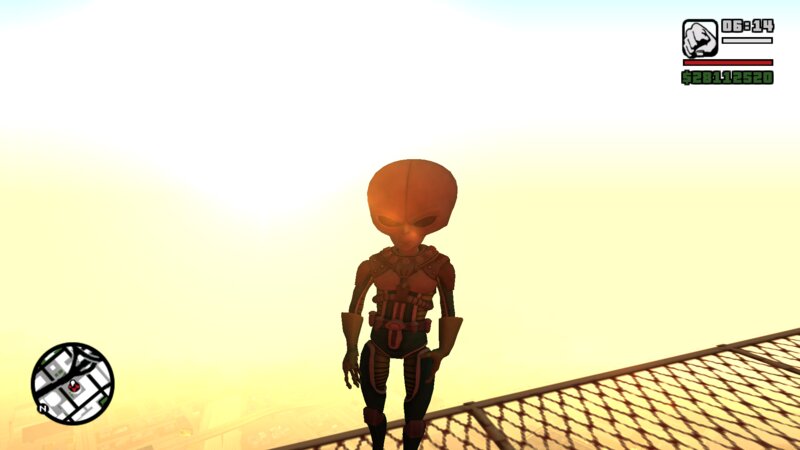
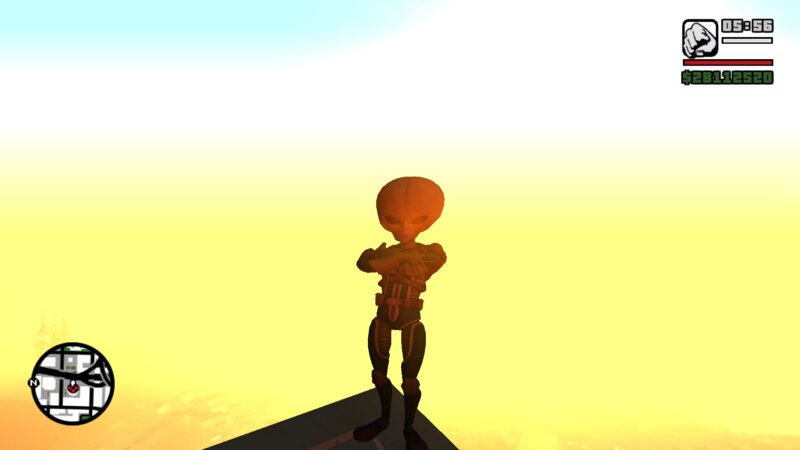
Unleash alien necromancy in GTA: San Andreas.
This mod fully replaces CJ’s voice, reactions, and combat sounds with Galactic Invader Ah Puch’s voice and effects from SMITE, transforming CJ into a cosmic, otherworldly conqueror. Every major vocal category has been replaced to match Ah Puch’s sinister sci-fi theme, delivering a unique alien presence throughout gameplay.
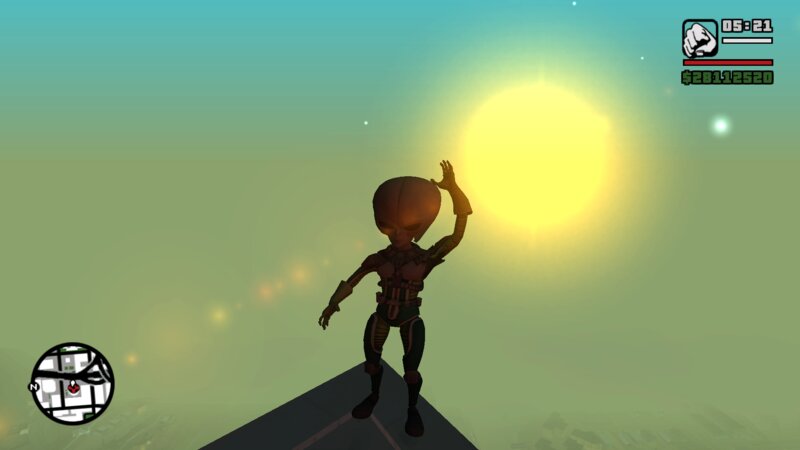
In addition to the voice overhaul, the mod includes CLEO-triggered animations with dialogue, allowing you to manually perform Ah Puch’s taunts, reactions, and expressions on demand.
---
? Features
?️ Full Voice Replacement (Galactic Invader Ah Puch – SMITE)
All CJ sounds are replaced with voice lines from Galactic Invader Ah Puch, including:
1 Death sound
10 Cop busted sounds
10 “Oh Sh*t” sounds (falling from high places)
4 Grunt sounds
5 Pain sounds
30 Taunt sounds
15 Positive dialogue lines
15 Negative dialogue lines
3 Gang “Follow Me” sounds
3 Gang “Wait / Stay Here” sounds
All sounds are carefully edited and mapped to GTA SA’s original voice events for smooth and immersive gameplay.
---
? CLEO Animation + Dialogue System
Trigger animations with matching dialogue anytime in-game:
Press Y → Positive dialogue + animation
Press N → Negative dialogue + animation
Press E → Emote dialogue + animation
Each key activates different animations, keeping interactions varied and dynamic.
---
? Included Skin
Galactic Invader Ah Puch
(This skin has also been released separately on my GTAInside page and is included here for convenience.)
---
? Requirements
To use the voicepack and animations:
ModLoader
CLEO
To use the skin only:
Skin Selector
---
?️ Installation
1. Install ModLoader and CLEO.
2. Extract the mod folder into your modloader directory.
3. Install the skin using Skin Selector (if not already installed).
4. Start the game and enjoy Galactic Invader Ah Puch in San Andreas.
---
⚠️ Notes
CJ’s original voice is completely replaced.
Intended for single-player use.
Compatible with most modded setups that support ModLoader.
---
? Credits
Hi-Rez Studios – Galactic Invader Ah Puch voice & character (SMITE)
Mod creation, sound editing & scripting – cupid22kad (Me)
This mod fully replaces CJ’s voice, reactions, and combat sounds with Galactic Invader Ah Puch’s voice and effects from SMITE, transforming CJ into a cosmic, otherworldly conqueror. Every major vocal category has been replaced to match Ah Puch’s sinister sci-fi theme, delivering a unique alien presence throughout gameplay.
In addition to the voice overhaul, the mod includes CLEO-triggered animations with dialogue, allowing you to manually perform Ah Puch’s taunts, reactions, and expressions on demand.
---
? Features
?️ Full Voice Replacement (Galactic Invader Ah Puch – SMITE)
All CJ sounds are replaced with voice lines from Galactic Invader Ah Puch, including:
1 Death sound
10 Cop busted sounds
10 “Oh Sh*t” sounds (falling from high places)
4 Grunt sounds
5 Pain sounds
30 Taunt sounds
15 Positive dialogue lines
15 Negative dialogue lines
3 Gang “Follow Me” sounds
3 Gang “Wait / Stay Here” sounds
All sounds are carefully edited and mapped to GTA SA’s original voice events for smooth and immersive gameplay.
---
? CLEO Animation + Dialogue System
Trigger animations with matching dialogue anytime in-game:
Press Y → Positive dialogue + animation
Press N → Negative dialogue + animation
Press E → Emote dialogue + animation
Each key activates different animations, keeping interactions varied and dynamic.
---
? Included Skin
Galactic Invader Ah Puch
(This skin has also been released separately on my GTAInside page and is included here for convenience.)
---
? Requirements
To use the voicepack and animations:
ModLoader
CLEO
To use the skin only:
Skin Selector
---
?️ Installation
1. Install ModLoader and CLEO.
2. Extract the mod folder into your modloader directory.
3. Install the skin using Skin Selector (if not already installed).
4. Start the game and enjoy Galactic Invader Ah Puch in San Andreas.
---
⚠️ Notes
CJ’s original voice is completely replaced.
Intended for single-player use.
Compatible with most modded setups that support ModLoader.
---
? Credits
Hi-Rez Studios – Galactic Invader Ah Puch voice & character (SMITE)
Mod creation, sound editing & scripting – cupid22kad (Me)
Komentarze
Liczba dodanych komentarzy: 0.