San Andreas / Mody / ENB Series
Dope - Low ENB
- NopeToDope, Boris Vorontsov & DKT70 | dodane przez NopeToDope
- gtainside.com/user/nopetodope
- 06/20/2015
- 7205 Pobrania
Oceny:
Najpierw się zaloguj.
Ulubione:
Pobierz
10.49Mb
Odsetek antywirusów, które wykryły zagrożenie: 0%
Zobacz raport skanowania antywirusowego
10.49Mb
Odsetek antywirusów, które wykryły zagrożenie: 0%
Zobacz raport skanowania antywirusowego
Videos
Nie dodano jeszcze filmów.Zaloguj się, żeby dodać film do tego moda.
Opis
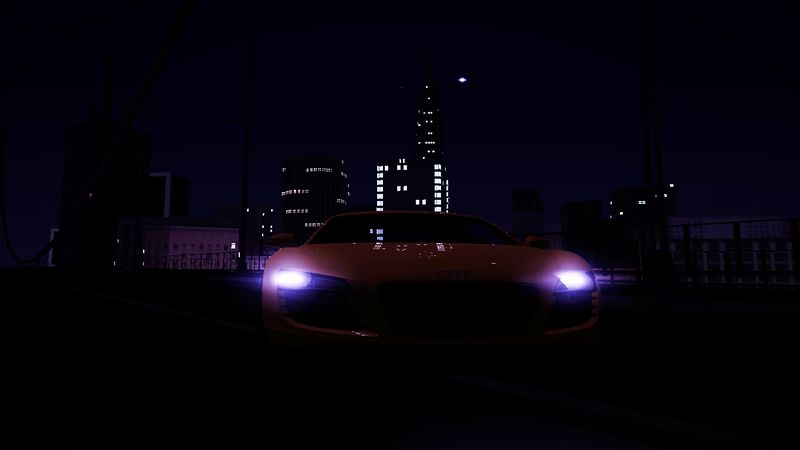
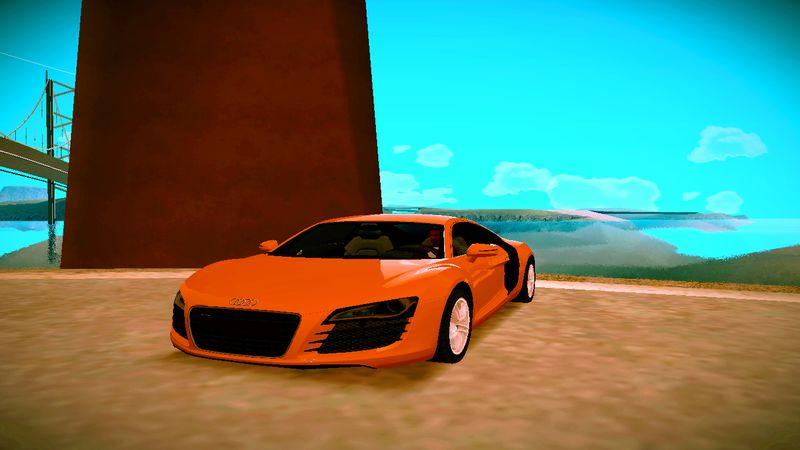
Dope ENB for low PC's
This mod is maded specially for low PC users. I have not included timecyc, particles, and effects etc. Please rate this ENB, i have noticed people just write 10/10 without rating :/ and if you rate it means alot for me :).
Features:
Tonemapping Shader
Realistic reflection
Beautiful water
Perfect colorcorrection
ENB Palette
Realistic shadows
and others...
Installation:
1. Extract all files with Winrar/7Zip
2. Open the files folder and copy all files
3. Go to your folder with SA and drag all files to the main folder
This mod is maded specially for low PC users. I have not included timecyc, particles, and effects etc. Please rate this ENB, i have noticed people just write 10/10 without rating :/ and if you rate it means alot for me :).
Features:
Tonemapping Shader
Realistic reflection
Beautiful water
Perfect colorcorrection
ENB Palette
Realistic shadows
and others...
Installation:
1. Extract all files with Winrar/7Zip
2. Open the files folder and copy all files
3. Go to your folder with SA and drag all files to the main folder
Komentarze
Liczba dodanych komentarzy: 21.



08/08/2015 01:11
can some one with a caring heart helpl me out? i installed this but my game cant open can someone just tell me EVERYTHING i need for enb mods? like EVERYTHING. my game doesnt show any pop ups, and it doesnt open/launch.
there is nothing wrong with my pc, i have accidentally installed a high-end enb to my low-end pc AND IT ACTUALLY WORKED!!! but it almost killed my computer
so please help me out. i really need enb series!!!
Cytuj | Odpowiedz | (0)
can some one with a caring heart helpl me out? i installed this but my game cant open
can someone just tell me EVERYTHING i need for enb mods? like EVERYTHING. my game doesnt show any pop ups, and it doesnt open/launch.
there is nothing wrong with my pc, i have accidentally installed a high-end enb to my low-end pc AND IT ACTUALLY WORKED!!! but it almost killed my computer
so please help me out. i really need enb series!!!
Cytuj | Odpowiedz | (0)



07/12/2015 12:45
Cytuj | Odpowiedz | (0)
Quote: NopeToDopeQuote: JrUtrera45
@NopeToDope
ProxyLibrary=d3d2?
I thought it was d3d3?
am i wrong or you are wrong? :)
Oh no The reflection still not changed though. :( i tried the settings you give..... I need strong reflections like this dope enb :)
Thats nothing, forget that
Quote: JrUtrera45
@NopeToDope
also i noticed that even i set the water quality to 2 it did not changed to clear water how do i set that in your soft enb?
UseWaterDeep=1
WaterDeepness=0 (lags)
WaterQuality=2
Set it like this!
Cytuj | Odpowiedz | (0)

07/12/2015 12:23
Thats nothing, forget that
UseWaterDeep=1
WaterDeepness=0 (lags)
WaterQuality=2
Set it like this!
Cytuj | Odpowiedz | (0)
Quote: JrUtrera45
@NopeToDope
ProxyLibrary=d3d2?
I thought it was d3d3?
am i wrong or you are wrong? :)
Thats nothing, forget that
Quote: JrUtrera45
@NopeToDope
also i noticed that even i set the water quality to 2 it did not changed to clear water how do i set that in your soft enb?
UseWaterDeep=1
WaterDeepness=0 (lags)
WaterQuality=2
Set it like this!
Cytuj | Odpowiedz | (0)
07/12/2015 09:08
[PROXY]
EnableProxyLibrary=0
InitProxyFunctions=1
ProxyLibrary=d3d2.dll
[GLOBAL]
UseEffect=0
AlternativeDepth=1
AllowAntialias=0
BugFixMode=3
SkipShaderOptimization=0
QuadVertexBuffer=0
EnableShaders_3_0=1
AdditionalConfigFile=enbseries2.ini
UseMRTRendering=0
TempF1=060
TempF2=100
TempF3=100
TempF4=80
TempF5=10
TempF6=0
TempF7=000
TempF8=000
TempF9=000
TempF0=000
[EFFECT]
EnableBloom=0
EnableOcclusion=0
EnableReflection=1
EnableMotionBlur=0
EnableWater=1
EnableShadow=1
DepthBias=100
EnableDepthOfField=0
[INPUT]
KeyUseEffect=123
KeyBloom=120
KeyOcclusion=121
KeyReflection=122
KeyCombination=16
KeyScreenshot=44
KeyShadow=119
KeyWater=118
KeyShowFPS=106
[REFLECTION]
ReflectionPower=4
ChromePower=4
UseCurrentFrameReflection=1
ReflectionQuality=2
ReflectionSourceSpecular=50
ReflectionSourceTFactor=50
UseAdditiveReflection=0
ReflectionDepthBias=1000
UseLowResReflection=0
ReflectionSinglePass=1
UseEnvBump=0
EnvBumpAmount=3
EnvBumpOffset=1
ReflectionFlip=1
[BLOOM]
BloomPowerDay=20
BloomFadeTime=0
BloomConstantDay=20
BloomQuality=0
BloomScreenLevelDay=20
BloomCurveDay=0
BloomPowerNight=0
BloomConstantNight=0
BloomCurveNight=0
BloomScreenLevelNight=20
BloomAdaptationScreenLevel=20
BloomAdaptationMultiplier=0
BloomAllowOversaturation=0
BloomMaxLimit=0
[SSAO]
UseFilter=0
OcclusionQuality=1
FilterQuality=2
DarkeningLevel=20
BrighteningLevel=5
IlluminationLevel=10
AdditiveIlluminationLevel=0
UseAmbientOcclusion=0
UseIndirectLighting=0
FadeDistance=50
UseForAlphaTest=1
UseForAlphaBlend=1
[COLORCORRECTION]
DarkeningAmountDay=23
ScreenLevelDay=70
ScreenLevelNight=35
DarkeningAmountNight=-7
GammaCurveDay=1
GammaCurveNight=1
ColorSaturationDay=2
ColorSaturationNight=-1
UsePaletteTexture=1
[WATER]
UseWaterDeep=1
WaterDeepness=0
WaterQuality=0
Deepness=100
Muddiness=200
UseWaterTexture=1
WaterTextureAmount=30
[SHADOW]
ShadowFadeStart=150
ShadowFadeEnd=300
ShadowAmountDay=67
ShadowAmountNight=38
ShadowScreenLevelDay=50
ShadowScreenLevelNight=25
ShadowQuality=2
UseShadowFilter=0
FilterQuality=2
ShadowBlurRange=1
[ENGINE]
ForceAnisotropicFiltering=1
MaxAnisotropy=1
ForceDisplayRefreshRate=1
DisplayRefreshRateHz=75
[MOTIONBLUR]
MotionBlurQuality=2
MotionBlurVelocity=13
MotionBlurRotation=10
[PERPIXELLIGHTING]
SpecularColorMin=4
SpecularColorMax=7
SpecularColorMultiplier=50
SpecularGlossinessMin=80
SpecularGlossinessMax=150
SpecularGlossinessMultiplier=1000
[DEPTHOFFIELD]
DOFQuality=2
DOFNumberOfPasses=4
DOFFocusRange=1000
DOFBlurinessRange=2
Try this i did not tryed, because i dont have my PC at the moment..
Cytuj | Odpowiedz | (0)
[PROXY]
EnableProxyLibrary=0
InitProxyFunctions=1
ProxyLibrary=d3d2.dll
[GLOBAL]
UseEffect=0
AlternativeDepth=1
AllowAntialias=0
BugFixMode=3
SkipShaderOptimization=0
QuadVertexBuffer=0
EnableShaders_3_0=1
AdditionalConfigFile=enbseries2.ini
UseMRTRendering=0
TempF1=060
TempF2=100
TempF3=100
TempF4=80
TempF5=10
TempF6=0
TempF7=000
TempF8=000
TempF9=000
TempF0=000
[EFFECT]
EnableBloom=0
EnableOcclusion=0
EnableReflection=1
EnableMotionBlur=0
EnableWater=1
EnableShadow=1
DepthBias=100
EnableDepthOfField=0
[INPUT]
KeyUseEffect=123
KeyBloom=120
KeyOcclusion=121
KeyReflection=122
KeyCombination=16
KeyScreenshot=44
KeyShadow=119
KeyWater=118
KeyShowFPS=106
[REFLECTION]
ReflectionPower=4
ChromePower=4
UseCurrentFrameReflection=1
ReflectionQuality=2
ReflectionSourceSpecular=50
ReflectionSourceTFactor=50
UseAdditiveReflection=0
ReflectionDepthBias=1000
UseLowResReflection=0
ReflectionSinglePass=1
UseEnvBump=0
EnvBumpAmount=3
EnvBumpOffset=1
ReflectionFlip=1
[BLOOM]
BloomPowerDay=20
BloomFadeTime=0
BloomConstantDay=20
BloomQuality=0
BloomScreenLevelDay=20
BloomCurveDay=0
BloomPowerNight=0
BloomConstantNight=0
BloomCurveNight=0
BloomScreenLevelNight=20
BloomAdaptationScreenLevel=20
BloomAdaptationMultiplier=0
BloomAllowOversaturation=0
BloomMaxLimit=0
[SSAO]
UseFilter=0
OcclusionQuality=1
FilterQuality=2
DarkeningLevel=20
BrighteningLevel=5
IlluminationLevel=10
AdditiveIlluminationLevel=0
UseAmbientOcclusion=0
UseIndirectLighting=0
FadeDistance=50
UseForAlphaTest=1
UseForAlphaBlend=1
[COLORCORRECTION]
DarkeningAmountDay=23
ScreenLevelDay=70
ScreenLevelNight=35
DarkeningAmountNight=-7
GammaCurveDay=1
GammaCurveNight=1
ColorSaturationDay=2
ColorSaturationNight=-1
UsePaletteTexture=1
[WATER]
UseWaterDeep=1
WaterDeepness=0
WaterQuality=0
Deepness=100
Muddiness=200
UseWaterTexture=1
WaterTextureAmount=30
[SHADOW]
ShadowFadeStart=150
ShadowFadeEnd=300
ShadowAmountDay=67
ShadowAmountNight=38
ShadowScreenLevelDay=50
ShadowScreenLevelNight=25
ShadowQuality=2
UseShadowFilter=0
FilterQuality=2
ShadowBlurRange=1
[ENGINE]
ForceAnisotropicFiltering=1
MaxAnisotropy=1
ForceDisplayRefreshRate=1
DisplayRefreshRateHz=75
[MOTIONBLUR]
MotionBlurQuality=2
MotionBlurVelocity=13
MotionBlurRotation=10
[PERPIXELLIGHTING]
SpecularColorMin=4
SpecularColorMax=7
SpecularColorMultiplier=50
SpecularGlossinessMin=80
SpecularGlossinessMax=150
SpecularGlossinessMultiplier=1000
[DEPTHOFFIELD]
DOFQuality=2
DOFNumberOfPasses=4
DOFFocusRange=1000
DOFBlurinessRange=2
Try this i did not tryed, because i dont have my PC at the moment..
Cytuj | Odpowiedz | (0)
07/12/2015 03:21
well i tested it and it is very smooth even without selecting very low pc files. but my problem with that enb is that the reflection was weak unlike this enb it has strong reflections without eating fps and also i like this dope enb because its bright when its day time. can you give me your enbseries.ini that has strong reflections and bright shaders for your soft enb?
Cytuj | Odpowiedz | (0)
Quote: NopeToDope
Yes bro!
well i tested it and it is very smooth even without selecting very low pc files. but my problem with that enb is that the reflection was weak unlike this enb it has strong reflections without eating fps and also i like this dope enb because its bright when its day time. can you give me your enbseries.ini that has strong reflections and bright shaders for your soft enb?
Cytuj | Odpowiedz | (0)
07/08/2015 02:38
My Specs:
Intel Core i3-4160 3.6 GHz
Intel HD Graphics 4400 Desktop
4 GB Ram
how about that can i run it smoothly?
Cytuj | Odpowiedz | (0)
Quote: NopeToDopeQuote: JrUtrera45
Do iget the same fps on my computer if install your soft realistic enb like this one? because this enb is awesome i realized using 'UseWaterDeepness' causes the most of enb lags
Try i dont know your specs. :)

My Specs:
Intel Core i3-4160 3.6 GHz
Intel HD Graphics 4400 Desktop
4 GB Ram
how about that can i run it smoothly?
Cytuj | Odpowiedz | (0)
07/05/2015 09:35
Yes, open the enbseries.ini and go down to water, and put the settings like this.
[WATER]
UseWaterDeep=0
WaterDeepness=0
WaterQuality=2
Thanks for 10/10 bro ily
Cytuj | Odpowiedz | (0)
Quote: JrUtrera45
WOW! I SAY THAT YOUR MOD IS AWESOME THANKS FOR YOUR SUGGESTION TO DISABLE WATER NOW IT RUNS 100% SMOOTH BUT how do i set the water to clear like many enb low? they say that clear water doesnt k*** fps. so any suggestion Dope?
Yes, open the enbseries.ini and go down to water, and put the settings like this.
[WATER]
UseWaterDeep=0
WaterDeepness=0
WaterQuality=2
Thanks for 10/10 bro ily
Cytuj | Odpowiedz | (0)


06/21/2015 08:31
Disable water in enbseries.ini
Cytuj | Odpowiedz | (0)
Quote: JrUtrera45
Your ENB is better than i post but this enb is specially for medium pc not low pc's well i have Intel Core i3-4160 and Intel HD Graphics 4400 and 4GB of ram. which is a high end gaming cpu. Your ENB Has many effects but it kills fps.
I recommended that you will need a graphics card like GTX 750Ti and not an integrated Graphics card so pls
Disable water in enbseries.ini
Cytuj | Odpowiedz | (0)
06/21/2015 04:37
Your ENB is better than i post but this enb is specially for medium pc not low pc's well i have Intel Core i3-4160 and Intel HD Graphics 4400 and 4GB of ram. which is a high end gaming cpu. Your ENB Has many effects but it kills fps.
I recommended that you will need a graphics card like GTX 750Ti and not an integrated Graphics card so plschange the title to for medium pc's
Cytuj | Odpowiedz | (0)
Your ENB is better than i post but this enb is specially for medium pc not low pc's well i have Intel Core i3-4160 and Intel HD Graphics 4400 and 4GB of ram. which is a high end gaming cpu. Your ENB Has many effects but it kills fps.
I recommended that you will need a graphics card like GTX 750Ti and not an integrated Graphics card so pls
change the title to for medium pc'sCytuj | Odpowiedz | (0)