San Andreas / Samochody / Ford
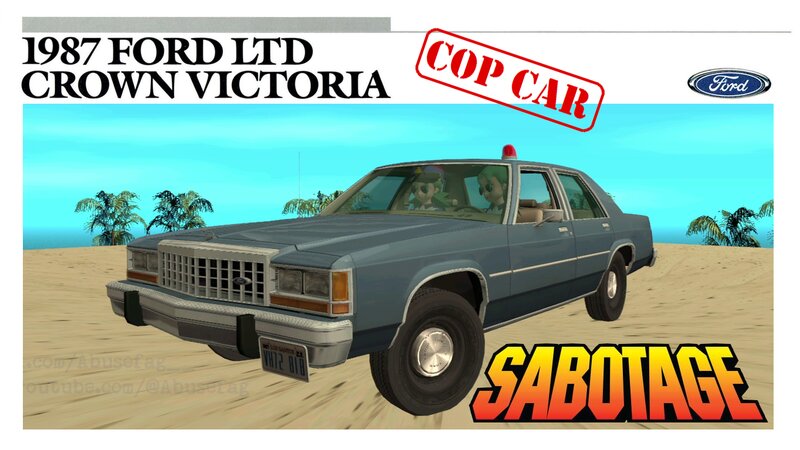
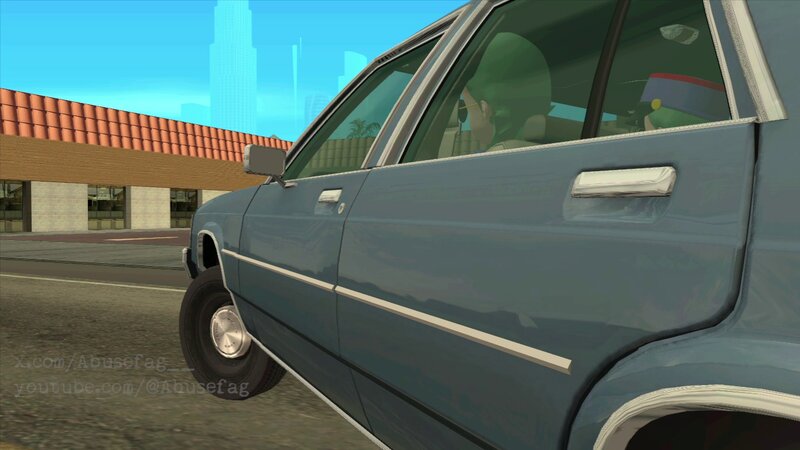
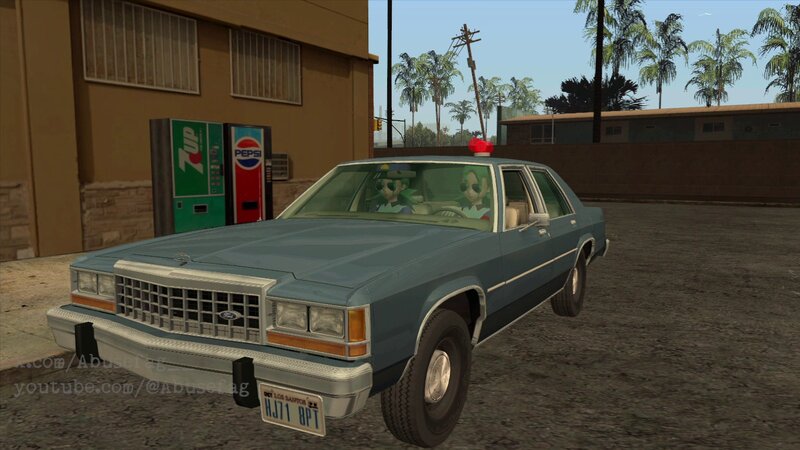
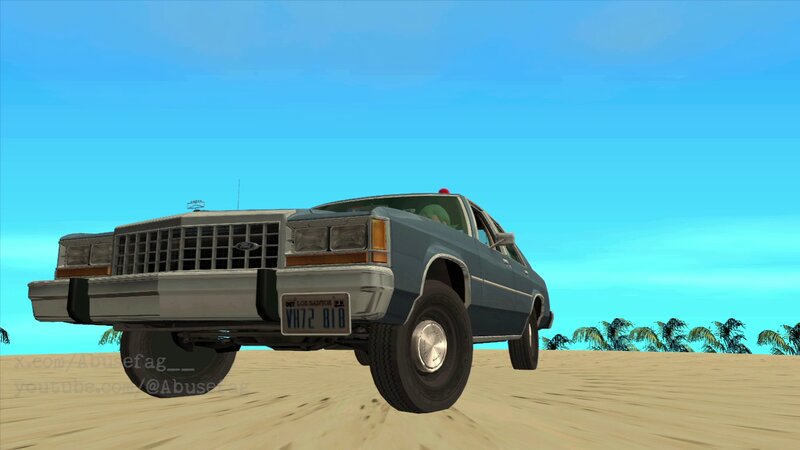
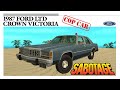
SABOTAGE 1987 Ford LTD Crown Victoria cop car
- Abusefag | dodane przez Abusefag
- 01/04/2026
- 907 Pobrania
Oceny:
Najpierw się zaloguj.
Ulubione:
Pobierz
15.76Mb
Odsetek antywirusów, które wykryły zagrożenie: 0%
Zobacz raport skanowania antywirusowego
15.76Mb
Odsetek antywirusów, które wykryły zagrożenie: 0%
Zobacz raport skanowania antywirusowego
Filmy
Zaloguj się, żeby dodać film do tego moda.
Opis
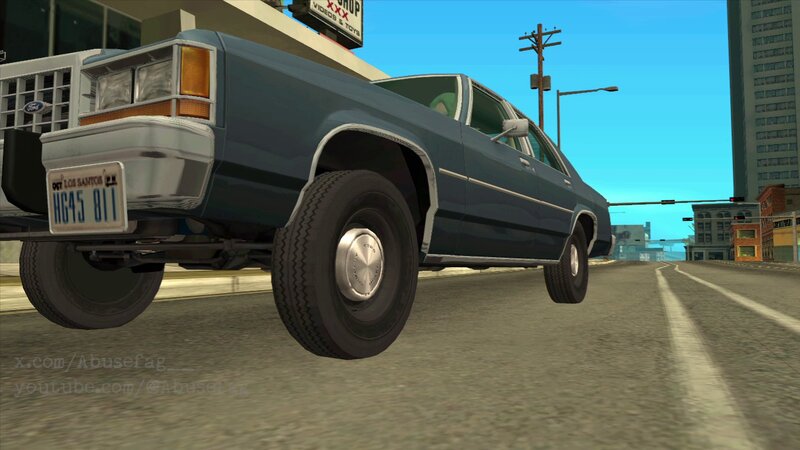
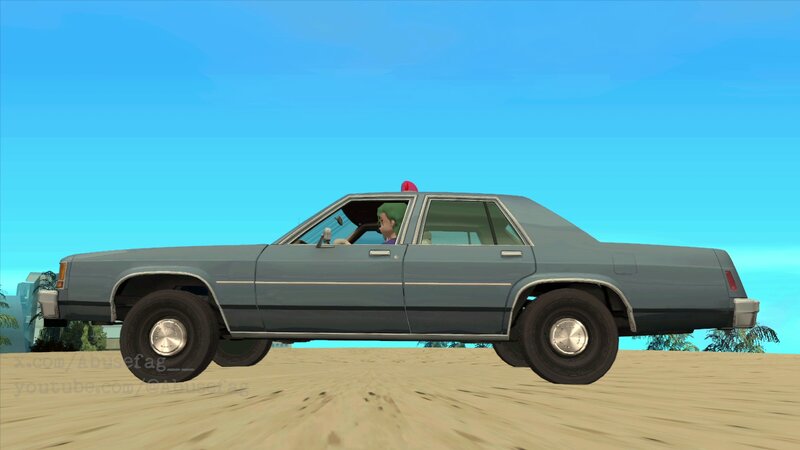
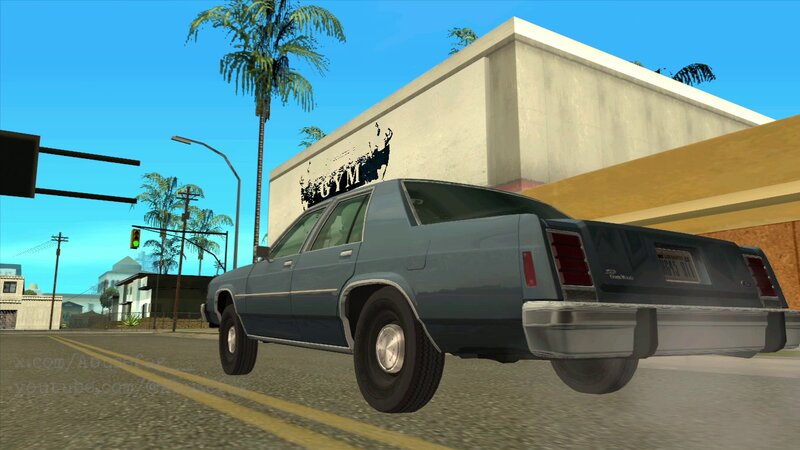
I always wanted a detective/unmarked version of this car with the Ford hub caps and with those metal lines on the doors just like the detective cars we can see in cop movies from 80s, but nobody in gta san andreas mod community ever made a version like this one...until today!
This is my first vehicle mod, so don't forget follow me so you don't miss any of my future car mods!
Trivia:
The Beastie Boys in the music video "SABOTAGE" shows a 1985 Ford LTD Crown Victoria but in the cover of their album they shows a Chevrolet caprice.
________________________________________________
INDEX:
1. SABOTAGE 1987 FORD LTD CROWN VICTORIA COP CAR
2. AUTHOR'S NOTE
3. HOW TO INSTALL CAR IN CLEO
4. HOW TO INSTALL CAR MANUALLY
5. HOW TO INSTALL SIREN POLICE MOD
6. HOW TO GET THE RIGHT BLUE COLOR FROM SABOTAGE MUSIC VIDEO
7. CREDITS
________________________________________________
1. SABOTAGE 1987 FORD LTD CROWN VICTORIA COP CAR
________________________________________________
2. AUTHOR'S NOTE
-If your GTA San Andreas crashes over and over, use the version from "SABOTAGE 3" folder. This is an optimized version without extra materials.
-I made several versions of this Ford car, some versions to be used with a siren police mod(SirenAndVigilante) and other versions where the siren/beacon police is just decorative:
SABOTAGE
(To be used with the siren police mod)
SABOTAGE 2
(With decorative siren police for those who don't want use the siren police mod)
SABOTAGE 3
(Backup car in case all the other models crash your gta san andreas)
I edited these cars to remplace the vanilla greenwoo. Yes, you can rename any of these files for whatever other car you want and said car will be remplaced for this new Ford skin, but if you do it you will need have to edit too both the carcold.dat and corrections.ini files in order the siren police mod and SABOTAGE blue color works in this new model of car you want remplace.
________________________________________________
3. HOW TO INSTALL CAR IN CLEO
Just drop both greenwoo.dff and greenwoo.txd files from "SABOTAGE" folder into your GTA San Andreas "\modloader\models" folder.
If your game crashes make sure to not have another skin that remplaces the skin of this same item in your "\modloader\models" folder.
________________________________________________
4. HOW TO INSTALL CAR MANUALLY
Using IMGTool or related go to your "gta3.img" file and remplace all the vanilla DFF and TXD files for these new DFF and TXD files.
________________________________________________
5. HOW TO INSTALL SIREN POLICE
-You will need CLEO to run this mod
-The version I include with this car mod is nothing but and edited version of this mod:
Siren and Vigilante by vladvo
https://libertycity.net/files/gta-san-andreas/208239-siren-and-vigilante.html
I didn't like this siren/beacon police made by vladvo so I did change the siren for one more realistic plus I had to fix the position of this new siren police in order to match with the roof of this custom Ford car.
To install this mod just drop the "SirenAndVigilante" folder into your "\modloader" folder.
To activate the siren police in game:
Get inside the Ford car, press and hold the key "P" and then press the key "[", now you will see an animation of CJ putting the siren on the roof of Ford the car, now you can play the VIGILANTE missions like if where a vanilla police car.
To remove the beacon police from the car press again the key "P" and then press the key "["
How to install without CLEO?:
"Add all .ifp, .dff and .txd files from the "siren" folder to the "gta3.img" file (this is in the "models" folder from the root game folder) using some IMG editor. Add the "polsiren.col" file to the "maps" folder from the "data" folder. Add the "polsiren.ide" file to the "leveldes" folder from the same "maps" folder, and add the lines from the "data.txt" file to the "gta.dat" file from the "data" folder. I don't know if it will work, so it's better to make copies of the same "gta.dat" and "gta3.img", but basically it's something like that.
But it's better not to bother and install Mod Loader if it works, it's much less hassle"
-MMK_033 user
https://libertycity.net/files/gta-san-andreas/208239-siren-and-vigilante.html
________________________________________________
6. HOW TO GET THE RIGHT BLUE COLOR FROM SABOTAGE MUSIC VIDEO
Remplace the vanilla "carcols.dat" file of your gta san andreas for the "carcols.dat" file from this mod. You can find your vanilla "carcols.dat" file in this path:
"Rockstar Games\Grand Theft Auto San Andreas\data"
Don't forget backup your original files!
After remplace this file your game only will spawn greenwoo cars having this SABOTAGE blue color. If you want other color you must go to a TransFender or a Pay 'n' Spray.
If you don't want remplace "carcols.dat" file I suggest you this trainer that allows you change the color of your car in just seconds:
Zolika1351's Trainer 23.07.04.1 REWRITTEN
https://www.gtainside.com/en/sanandreas/trainers/168203-zolika1351-s-trainer-21-08-12-2-rewritten/
After install this trainer, in game, inside a car, press the key "F7" and follow this path:
Menu > Vehicle's option > Color > Color 1 > 60/255 lt.crystal blue poly
(You can change the color of seats too!, see "color 2")
Anyway this is the color I used in case you want only change one single car:
78,104,129 # 59 lt.crystal blue poly blue
________________________________________________
7. CREDITS
Original base car model by Oleg_Terenchuk:
Ford LTD Crown Victoria '87 Police Pack
https://libertycity.net/files/gta-san-andreas-ios-android/181219-ford-ltd-crown-victoria-87-police-pack.html
Special thanks to Carface80, Stratumx and Funky for fixing the UV mapping of Oleg_Terenchuk's original model(I love you guys):
Ford LTD Crown Victoria 1987 Unmarked
https://libertycity.net/files/gta-san-andreas-ios-android/196682-ford-ltd-crown-victoria-1987-unmarked.html
GTA San Andreas SABOTAGE 1987 Ford LTD Crown Victoria cop car edited by Abusefag
https://www.youtube.com/@Abusefag
https://x.com/Abusefag__
https://www.gtainside.de/user/Abusefag
Sunday January 4th 2026.
This is my first vehicle mod, so don't forget follow me so you don't miss any of my future car mods!
Trivia:
The Beastie Boys in the music video "SABOTAGE" shows a 1985 Ford LTD Crown Victoria but in the cover of their album they shows a Chevrolet caprice.
________________________________________________
INDEX:
1. SABOTAGE 1987 FORD LTD CROWN VICTORIA COP CAR
2. AUTHOR'S NOTE
3. HOW TO INSTALL CAR IN CLEO
4. HOW TO INSTALL CAR MANUALLY
5. HOW TO INSTALL SIREN POLICE MOD
6. HOW TO GET THE RIGHT BLUE COLOR FROM SABOTAGE MUSIC VIDEO
7. CREDITS
________________________________________________
1. SABOTAGE 1987 FORD LTD CROWN VICTORIA COP CAR
________________________________________________
2. AUTHOR'S NOTE
-If your GTA San Andreas crashes over and over, use the version from "SABOTAGE 3" folder. This is an optimized version without extra materials.
-I made several versions of this Ford car, some versions to be used with a siren police mod(SirenAndVigilante) and other versions where the siren/beacon police is just decorative:
SABOTAGE
(To be used with the siren police mod)
SABOTAGE 2
(With decorative siren police for those who don't want use the siren police mod)
SABOTAGE 3
(Backup car in case all the other models crash your gta san andreas)
I edited these cars to remplace the vanilla greenwoo. Yes, you can rename any of these files for whatever other car you want and said car will be remplaced for this new Ford skin, but if you do it you will need have to edit too both the carcold.dat and corrections.ini files in order the siren police mod and SABOTAGE blue color works in this new model of car you want remplace.
________________________________________________
3. HOW TO INSTALL CAR IN CLEO
Just drop both greenwoo.dff and greenwoo.txd files from "SABOTAGE" folder into your GTA San Andreas "\modloader\models" folder.
If your game crashes make sure to not have another skin that remplaces the skin of this same item in your "\modloader\models" folder.
________________________________________________
4. HOW TO INSTALL CAR MANUALLY
Using IMGTool or related go to your "gta3.img" file and remplace all the vanilla DFF and TXD files for these new DFF and TXD files.
________________________________________________
5. HOW TO INSTALL SIREN POLICE
-You will need CLEO to run this mod
-The version I include with this car mod is nothing but and edited version of this mod:
Siren and Vigilante by vladvo
https://libertycity.net/files/gta-san-andreas/208239-siren-and-vigilante.html
I didn't like this siren/beacon police made by vladvo so I did change the siren for one more realistic plus I had to fix the position of this new siren police in order to match with the roof of this custom Ford car.
To install this mod just drop the "SirenAndVigilante" folder into your "\modloader" folder.
To activate the siren police in game:
Get inside the Ford car, press and hold the key "P" and then press the key "[", now you will see an animation of CJ putting the siren on the roof of Ford the car, now you can play the VIGILANTE missions like if where a vanilla police car.
To remove the beacon police from the car press again the key "P" and then press the key "["
How to install without CLEO?:
"Add all .ifp, .dff and .txd files from the "siren" folder to the "gta3.img" file (this is in the "models" folder from the root game folder) using some IMG editor. Add the "polsiren.col" file to the "maps" folder from the "data" folder. Add the "polsiren.ide" file to the "leveldes" folder from the same "maps" folder, and add the lines from the "data.txt" file to the "gta.dat" file from the "data" folder. I don't know if it will work, so it's better to make copies of the same "gta.dat" and "gta3.img", but basically it's something like that.
But it's better not to bother and install Mod Loader if it works, it's much less hassle"
-MMK_033 user
https://libertycity.net/files/gta-san-andreas/208239-siren-and-vigilante.html
________________________________________________
6. HOW TO GET THE RIGHT BLUE COLOR FROM SABOTAGE MUSIC VIDEO
Remplace the vanilla "carcols.dat" file of your gta san andreas for the "carcols.dat" file from this mod. You can find your vanilla "carcols.dat" file in this path:
"Rockstar Games\Grand Theft Auto San Andreas\data"
Don't forget backup your original files!
After remplace this file your game only will spawn greenwoo cars having this SABOTAGE blue color. If you want other color you must go to a TransFender or a Pay 'n' Spray.
If you don't want remplace "carcols.dat" file I suggest you this trainer that allows you change the color of your car in just seconds:
Zolika1351's Trainer 23.07.04.1 REWRITTEN
https://www.gtainside.com/en/sanandreas/trainers/168203-zolika1351-s-trainer-21-08-12-2-rewritten/
After install this trainer, in game, inside a car, press the key "F7" and follow this path:
Menu > Vehicle's option > Color > Color 1 > 60/255 lt.crystal blue poly
(You can change the color of seats too!, see "color 2")
Anyway this is the color I used in case you want only change one single car:
78,104,129 # 59 lt.crystal blue poly blue
________________________________________________
7. CREDITS
Original base car model by Oleg_Terenchuk:
Ford LTD Crown Victoria '87 Police Pack
https://libertycity.net/files/gta-san-andreas-ios-android/181219-ford-ltd-crown-victoria-87-police-pack.html
Special thanks to Carface80, Stratumx and Funky for fixing the UV mapping of Oleg_Terenchuk's original model(I love you guys):
Ford LTD Crown Victoria 1987 Unmarked
https://libertycity.net/files/gta-san-andreas-ios-android/196682-ford-ltd-crown-victoria-1987-unmarked.html
GTA San Andreas SABOTAGE 1987 Ford LTD Crown Victoria cop car edited by Abusefag
https://www.youtube.com/@Abusefag
https://x.com/Abusefag__
https://www.gtainside.de/user/Abusefag
Sunday January 4th 2026.
Komentarze
Liczba dodanych komentarzy: 0.