GTA V / Narzędzia / Tworzenie własnych modów
VehicleStar - Vehicle Path Recorder
- alexscript | dodane przez alexscript
- github.com/AlexScriptMods/V...
- 11/27/2025
- 1011 Pobrania
Oceny:
Najpierw się zaloguj.
Ulubione:
Pobierz
9.83Kb
Odsetek antywirusów, które wykryły zagrożenie: 0%
Zobacz raport skanowania antywirusowego
9.83Kb
Odsetek antywirusów, które wykryły zagrożenie: 0%
Zobacz raport skanowania antywirusowego

Videos

Zaloguj się, żeby dodać film do tego moda.
Opis
VehicleStar - Vehicle Path Recorder 1.0 [ALPHA]
This tool allows you to record, play, and export custom vehicle paths in YVR format. The mod is perfect for creating cinematic scenes and races.
For full guides, tutorials, and detailed documentation, visit the project page on Github.
Features:
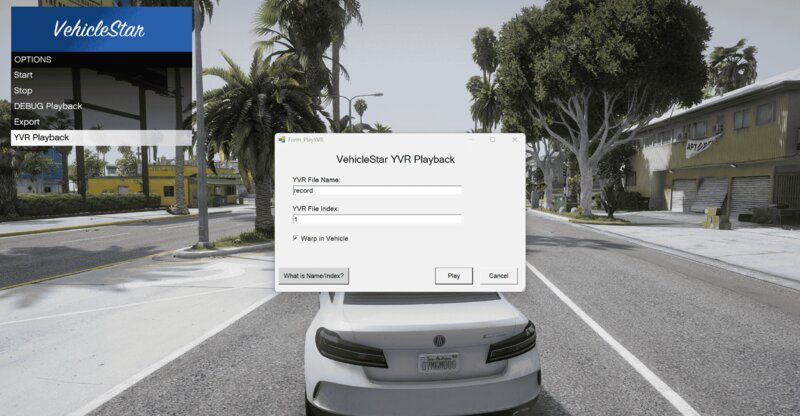
Press Z in-game to open the menu, then scroll and press Enter to navigate.
Recording:
Use the Start and Stop buttons to record the path of your vehicle in real time while driving.
Playback:
VehicleStar provides two playback systems:
YVR Playback: Plays the recorded path using the exported .yvr file. Requires importing the .yvr into the game files via OpenIV and restarting the game.
DEBUG Playback: Allows you to quickly test the recorded path without importing or restarting the game. This system uses simplified playback and does not render all visual effects.
Exporting:
Use the Export button to export the recording as .xml and .yvr files. Files are saved in the directory specified in config.xml inside the scripts folder.
This tool allows you to record, play, and export custom vehicle paths in YVR format. The mod is perfect for creating cinematic scenes and races.
For full guides, tutorials, and detailed documentation, visit the project page on Github.
Features:
- Record vehicle movement in real time while driving
- Save recordings as .yvr, allowing you to utilise the Rockstar advanced vehicle playback system
- Debug playback for quick tests of the recorded path
- Simple in-game UI
- Place all files from the mod in your scripts folder inside your GTAV root.
- Download CodeWalker, then copy and paste CodeWalker.Core.dll and SharpDX.Mathematics.dll from the downloaded CodeWalker folder into the scripts folder.
Press Z in-game to open the menu, then scroll and press Enter to navigate.
Recording:
Use the Start and Stop buttons to record the path of your vehicle in real time while driving.
Playback:
VehicleStar provides two playback systems:
YVR Playback: Plays the recorded path using the exported .yvr file. Requires importing the .yvr into the game files via OpenIV and restarting the game.
DEBUG Playback: Allows you to quickly test the recorded path without importing or restarting the game. This system uses simplified playback and does not render all visual effects.
Exporting:
Use the Export button to export the recording as .xml and .yvr files. Files are saved in the directory specified in config.xml inside the scripts folder.
Komentarze
Liczba dodanych komentarzy: 0.