GTA V / Mody / Mody skryptowe
Simple Fuel
- LeFix
- 02/14/2016
- 20418 Pobrania
Oceny:
Najpierw się zaloguj.
Ulubione:
Pobierz
61.81Kb
61.81Kb
Videos
Nie dodano jeszcze filmów.Zaloguj się, żeby dodać film do tego moda.
Opis
Simple Fuel Mod
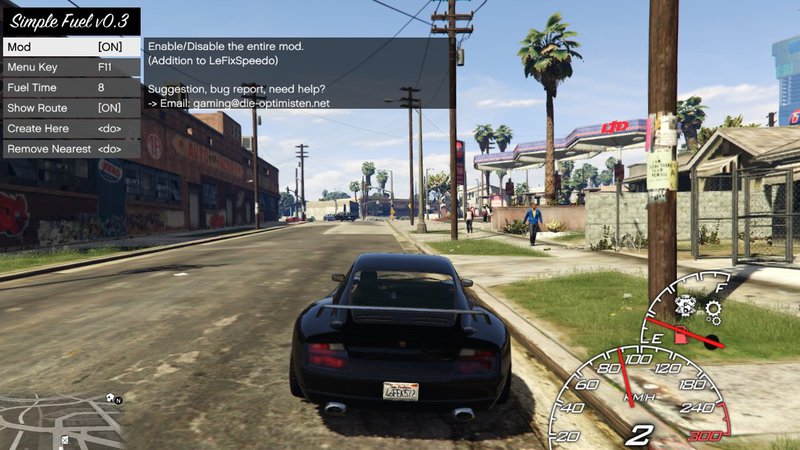
Adds a fuel tank to all road vehicles.
The consumption is time based and refilling is possible at any fuel station.
Mod menu can be opened with F11 (default).
HUD is part of my speedo mod!
Changelog:
v0.4.2 (minor update)
-no fuel consumption in cutscenes, while tuning...
v0.4.1 (minor update)
-better notifications behavior
v0.4
-reorganized classes
-added realistic refuel option
-more notifications
-can't create multiple stations at one place anymore
-coordinates now contain height (fixes few minor bugs)
-blip name and main notifications can be changed
(access the ini, and change it to any text/any language)
v0.3
-Optional route to gas station
-Blips have names
-bugfix: removed blips at (0/0)
v0.2
-Consumptions depends on thottle
v0.1
-Initial release
Question to other modders:
I want to hide the gas station blips when "Less details" in the map viewer is selected. How do I achieve that?
Installation:
Drop .asi and .ini in the GTA V main folder.
Adds a fuel tank to all road vehicles.
The consumption is time based and refilling is possible at any fuel station.
Mod menu can be opened with F11 (default).
HUD is part of my speedo mod!
Changelog:
v0.4.2 (minor update)
-no fuel consumption in cutscenes, while tuning...
v0.4.1 (minor update)
-better notifications behavior
v0.4
-reorganized classes
-added realistic refuel option
-more notifications
-can't create multiple stations at one place anymore
-coordinates now contain height (fixes few minor bugs)
-blip name and main notifications can be changed
(access the ini, and change it to any text/any language)
v0.3
-Optional route to gas station
-Blips have names
-bugfix: removed blips at (0/0)
v0.2
-Consumptions depends on thottle
v0.1
-Initial release
Question to other modders:
I want to hide the gas station blips when "Less details" in the map viewer is selected. How do I achieve that?
Installation:
Drop .asi and .ini in the GTA V main folder.
Komentarze
Liczba dodanych komentarzy: 3.