GTA V / Samochody / Policja
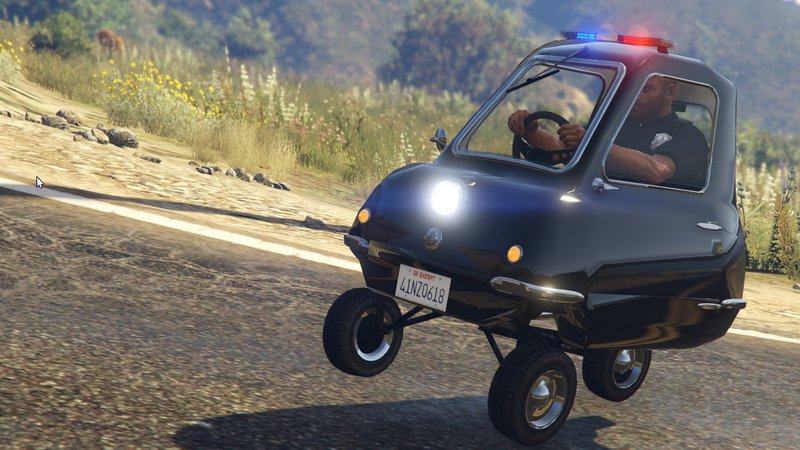
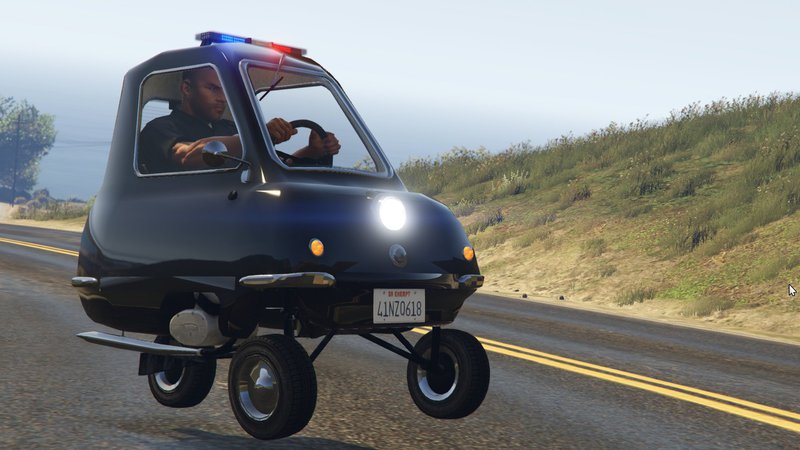
Police Peel P50
- toffytastic | dodane przez milic11
- 10/18/2015
- 6851 Pobrania
Oceny:
Najpierw się zaloguj.
Ulubione:
Pobierz
2.53Mb
Odsetek antywirusów, które wykryły zagrożenie: 0%
Zobacz raport skanowania antywirusowego
2.53Mb
Odsetek antywirusów, które wykryły zagrożenie: 0%
Zobacz raport skanowania antywirusowego
Filmy


Zaloguj się, żeby dodać film do tego moda.
Opis
Hi!,decided to add some police lights to the smallest car in the world Peel P50!
Police Lights added by: toffytastic
https://www.youtube.com/user/toffytastic
https://twitter.com/toffytastic
Original Peel P50 Model by popos1
https://www.gta5-mods.com/vehicles/peel-p50
————————————————————
Requirements for the Model
————————————————————
OpenIV (for changing the textures)
FREE Download: http://openiv.com/
And the download added within this post
————————————————————
Model Installation Process
————————————————————
1. Open OpenIV
2. Go to Grand Theft Auto\update\x64\dlcpacks\patchday4ng\dlc.rpf\x64\levels\gta5\vehicles.rpf
3. Press Edit to edit
4. Replace the Police3 within vehicles.rpf with the one provided within Peel Model
5. Press save and then you are done.
Please feel free to message me about any problems, suggestion etc. :)
Police Lights added by: toffytastic
https://www.youtube.com/user/toffytastic
https://twitter.com/toffytastic
Original Peel P50 Model by popos1
https://www.gta5-mods.com/vehicles/peel-p50
————————————————————
Requirements for the Model
————————————————————
OpenIV (for changing the textures)
FREE Download: http://openiv.com/
And the download added within this post
————————————————————
Model Installation Process
————————————————————
1. Open OpenIV
2. Go to Grand Theft Auto\update\x64\dlcpacks\patchday4ng\dlc.rpf\x64\levels\gta5\vehicles.rpf
3. Press Edit to edit
4. Replace the Police3 within vehicles.rpf with the one provided within Peel Model
5. Press save and then you are done.
Please feel free to message me about any problems, suggestion etc. :)
Komentarze
Liczba dodanych komentarzy: 9.