GTA IV / Narzędzia / Dodawanie nowych plików
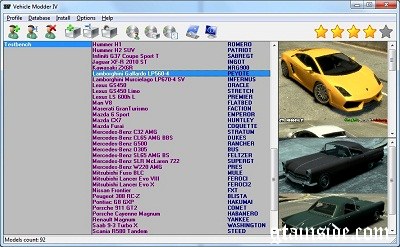
Vehicle Modder IV
- Dmitry Galin
- 11/25/2010
- 89678 Pobrania
Oceny:
Najpierw się zaloguj.
Ulubione:
Pobierz
16.23Mb
16.23Mb
Videos
Nie dodano jeszcze filmów.Zaloguj się, żeby dodać film do tego moda.
Opis
Vehicle Modder IV v1.0 is an application for GTA IV vehicles replacing, built as database for vehicles and user profiles.
Komentarze
Liczba dodanych komentarzy: 7.

04/18/2011 08:34
When yoy are creating an interface for your program, and you whant to make it look cool with windows 7 icons, dont be a dick and create explanations about your icont, that user of your program could by hovering ower icon imidiatly understant what is it used for.
Cytuj | Odpowiedz | (0)
When yoy are creating an interface for your program, and you whant to make it look cool with windows 7 icons, dont be a dick and create explanations about your icont, that user of your program could by hovering ower icon imidiatly understant what is it used for.
Cytuj | Odpowiedz | (0)
03/06/2011 08:00
Kleine Anleitung für die korrekte Installation und Verwendung:)
1. Wenn Sie haben keine BDE auf Ihrem Computer installieren sie zuerst - Run bde_setup.exe
2. Anwendung installieren.
3. Erstellen Sie Datenbank und setzen ihren Weg in Parameter.
4. Schreibe Fahrzeuge Datenbank.
5. Erstellen Sie Profil und ordnen Autos aus der Datenbank bis Autos in das Spiel. Sie können mehrere Profile erstellen.
6. Drücken Sie "Profil installieren" - Fahrzeuge im Spiel werden von Fahrzeugen aus gewählten Profil replased.
7. Sie können Fahrzeug zu ersetzen Spiel direkt mit Installieren von Dateien Befehl.
8. Sie können Fahrzeuge direkt aus der Datenbank zu ersetzen, ohne die Verwendung von Profilen - Installieren Sie von der Datenbank.
Genießen Sie. habe es mal übersetst....
Cytuj | Odpowiedz | (0)
Kleine Anleitung für die korrekte Installation und Verwendung:)
1. Wenn Sie haben keine BDE auf Ihrem Computer installieren sie zuerst - Run bde_setup.exe
2. Anwendung installieren.
3. Erstellen Sie Datenbank und setzen ihren Weg in Parameter.
4. Schreibe Fahrzeuge Datenbank.
5. Erstellen Sie Profil und ordnen Autos aus der Datenbank bis Autos in das Spiel. Sie können mehrere Profile erstellen.
6. Drücken Sie "Profil installieren" - Fahrzeuge im Spiel werden von Fahrzeugen aus gewählten Profil replased.
7. Sie können Fahrzeug zu ersetzen Spiel direkt mit Installieren von Dateien Befehl.
8. Sie können Fahrzeuge direkt aus der Datenbank zu ersetzen, ohne die Verwendung von Profilen - Installieren Sie von der Datenbank.
Genießen Sie. habe es mal übersetst....
Cytuj | Odpowiedz | (0)

11/25/2010 21:34
Small instruction for correct installation and using :)
1. If You have no BDE on your computer install it first - Run bde_setup.exe
2. Install application.
3. Create You database and set its path in Parameters.
4. Add vehicles to database.
5. Create You profile and assign cars from database to cars in the Game. You can create several profiles.
6. Press Install Profile - Vehicles in the Game will replased by vehicles from chosen profile.
7. You can replace vehicle to Game directly using Install from files command.
8. You can replace vehicles directly from database without using profiles - Install from database.
Enjoy.
Cytuj | Odpowiedz | (0)
Small instruction for correct installation and using :)
1. If You have no BDE on your computer install it first - Run bde_setup.exe
2. Install application.
3. Create You database and set its path in Parameters.
4. Add vehicles to database.
5. Create You profile and assign cars from database to cars in the Game. You can create several profiles.
6. Press Install Profile - Vehicles in the Game will replased by vehicles from chosen profile.
7. You can replace vehicle to Game directly using Install from files command.
8. You can replace vehicles directly from database without using profiles - Install from database.
Enjoy.
Cytuj | Odpowiedz | (0)