GTA V / Samochody / Tekstury
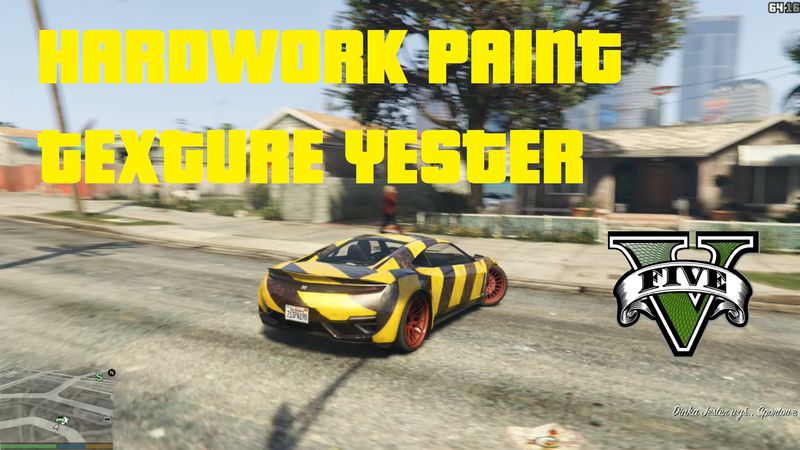
Hardwork Paint Yester
- Bartolomeo Bartolini | dodane przez Infernalisss
- 05/21/2015
- 3955 Pobrania
Oceny:
Najpierw się zaloguj.
Ulubione:
Pobierz
987.33Kb
Odsetek antywirusów, które wykryły zagrożenie: 0%
Zobacz raport skanowania antywirusowego
987.33Kb
Odsetek antywirusów, które wykryły zagrożenie: 0%
Zobacz raport skanowania antywirusowego
Videos
Nie dodano jeszcze filmów.Zaloguj się, żeby dodać film do tego moda.
Opis
FIRST WATCH VIDEO !!!!!!!!!!!!
https://www.youtube.com/watch?v=1bDSKFAzi1c
1. Go into GTA V in OpenIV.
2. navigate to update\x64\dlcpacks\mpchristmas2\
dlc.rpf\x64\levels\gta5\vehicles\
xmas2vehicles.rpf. and make sure Edit Mode
is activated.
3. Then find jester2.ytd.
4. Make a backup copy (Extract it).
5. Replace it with jester2.ytd
https://www.youtube.com/watch?v=1bDSKFAzi1c
1. Go into GTA V in OpenIV.
2. navigate to update\x64\dlcpacks\mpchristmas2\
dlc.rpf\x64\levels\gta5\vehicles\
xmas2vehicles.rpf. and make sure Edit Mode
is activated.
3. Then find jester2.ytd.
4. Make a backup copy (Extract it).
5. Replace it with jester2.ytd
Komentarze
Liczba dodanych komentarzy: 2.


05/21/2015 12:29
https://www.youtube.com/watch?v=1bDSKFAzi1c
1. Go into GTA V in OpenIV.
2. navigate to updatex64dlcpacksmpchristmas2
dlc.rpfx64levelsgta5vehicles
xmas2vehicles.rpf. and make sure Edit Mode
is activated.
3. Then find jester2.ytd.
4. Make a backup copy (Extract it).
5. Replace it with jester2.ytd
Cytuj | Odpowiedz | (0)
https://www.youtube.com/watch?v=1bDSKFAzi1c
1. Go into GTA V in OpenIV.
2. navigate to updatex64dlcpacksmpchristmas2
dlc.rpfx64levelsgta5vehicles
xmas2vehicles.rpf. and make sure Edit Mode
is activated.
3. Then find jester2.ytd.
4. Make a backup copy (Extract it).
5. Replace it with jester2.ytd
Cytuj | Odpowiedz | (0)