San Andreas / Samochody / Nissan
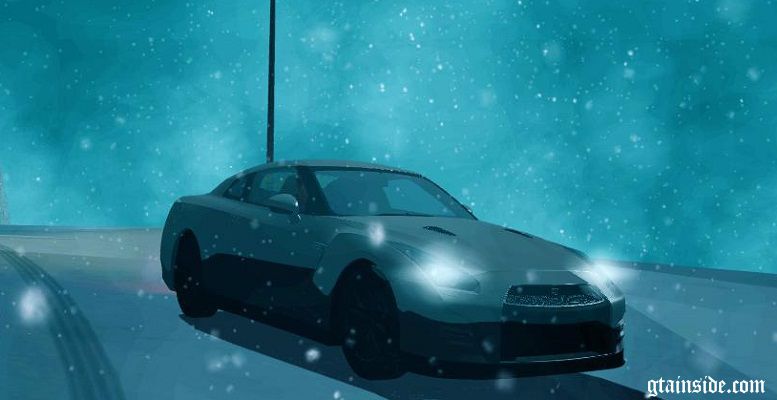
2012 Nissan GTR (R35) Tunable V2
- xshima222
- amalia222.blogspot.com
- 12/14/2012
- 27428 Pobrania
Oceny:
Najpierw się zaloguj.
Ulubione:
Pobierz
20.45Mb
20.45Mb
Videos


Zaloguj się, żeby dodać film do tego moda.
Opis
2012 Nissan GT-R Black Edition (R35) V2
Converted from Forza Horizon to GTA SA by xshima222
Thanks to Nathan Ferdinand for editing ImVehFt
3D Models: TURN 10 / Forza Horizon
Some Cokpit Textures & 3D Engine : NFS SHIFT 2
Changelog :
- V2 : Black coloured window and Improved Shadow
- V1 : first make, maybe have many bugs
Some Bugs:
- Bugs : - Window Color changed to black
- Shadow in body, thx to [MADC]AVENTANDOR[RDH] for find this bug
All Features:
- Realistic detailed model
- Realistic Collision
- Realistic 3D Engine From NFS Shift 2
- Realistc Shadow
- Realistic Damage
- Custom paint jobs
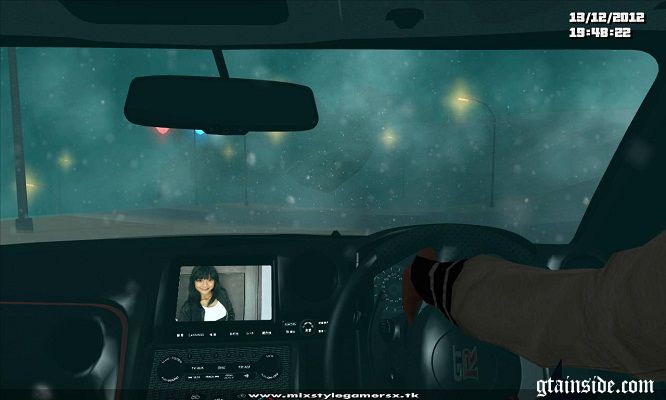
- Realistic detailed Cockpit
- 2 Type Cockpit (Colourable and Gold Stripes & Black Gold and Red Stripes)
- High Quality material
- Replaces the Elegy
- Retextured cockpit
- Fully working in SAMP
- Tunable model
- Paintjob template
Adapted for ImVehFT, below are the new features after you install the ImVehFT:
- Working reverse lights
- Working turn signals
- Working interior lights
- Working separated fog lamps & headlights
- Working brake calipers
Adapted for active dashboard by Izerli too, below are the new features after you install the active dashboard:
- Working steering wheel
- Working windshield wipers
- Working speedometer and tachometer
Now you don't need to replace any handling lines, vehicle.ide lines, etc, like in another HQ mods
INSTALLATION TUTORIAL
Make sure you have IMG Manager v1.5 or any similiar tools.
Extract the folder to any directory you wish.
Open the models\gta3.img with IMG Manager.
Find the model & replace with the new ones, or use bulk replace if you using IMG Manager v1.5.
Rebuild archive, exit the manager & enjoy the game.
CLEO 4 INSTALLATION
Install the CLEO4 with the installer (included)
Follow the installation instruction in the application.
Copy the contents of CLEO folder in the archive to GTA San Andreas\CLEO.
Do the same instructions for audio.
Please contact us if you found any bugs.
If you want to get more updates or asking for permission, visit xshima22.blogspot.com or follow http://twitter.com/xshima222
Acknowledgements:
DKK2PAC : ImVehFt Founder
Nathan Ferdinand : Editing for ImVehFt
[MADC]AVENTANDOR[RDH] : Thanks to him for find the shadow bugs
[GT]Harry : Moral Support
and many people from MIX$TYLEGAMERSX and ENBseries Indonesia Group
Converted from Forza Horizon to GTA SA by xshima222
Thanks to Nathan Ferdinand for editing ImVehFt
3D Models: TURN 10 / Forza Horizon
Some Cokpit Textures & 3D Engine : NFS SHIFT 2
Changelog :
- V2 : Black coloured window and Improved Shadow
- V1 : first make, maybe have many bugs
Some Bugs:
- Bugs : - Window Color changed to black
- Shadow in body, thx to [MADC]AVENTANDOR[RDH] for find this bug
All Features:
- Realistic detailed model
- Realistic Collision
- Realistic 3D Engine From NFS Shift 2
- Realistc Shadow
- Realistic Damage
- Custom paint jobs
- Realistic detailed Cockpit
- 2 Type Cockpit (Colourable and Gold Stripes & Black Gold and Red Stripes)
- High Quality material
- Replaces the Elegy
- Retextured cockpit
- Fully working in SAMP
- Tunable model
- Paintjob template
Adapted for ImVehFT, below are the new features after you install the ImVehFT:
- Working reverse lights
- Working turn signals
- Working interior lights
- Working separated fog lamps & headlights
- Working brake calipers
Adapted for active dashboard by Izerli too, below are the new features after you install the active dashboard:
- Working steering wheel
- Working windshield wipers
- Working speedometer and tachometer
Now you don't need to replace any handling lines, vehicle.ide lines, etc, like in another HQ mods
INSTALLATION TUTORIAL
Make sure you have IMG Manager v1.5 or any similiar tools.
Extract the folder to any directory you wish.
Open the models\gta3.img with IMG Manager.
Find the model & replace with the new ones, or use bulk replace if you using IMG Manager v1.5.
Rebuild archive, exit the manager & enjoy the game.
CLEO 4 INSTALLATION
Install the CLEO4 with the installer (included)
Follow the installation instruction in the application.
Copy the contents of CLEO folder in the archive to GTA San Andreas\CLEO.
Do the same instructions for audio.
Please contact us if you found any bugs.
If you want to get more updates or asking for permission, visit xshima22.blogspot.com or follow http://twitter.com/xshima222
Acknowledgements:
DKK2PAC : ImVehFt Founder
Nathan Ferdinand : Editing for ImVehFt
[MADC]AVENTANDOR[RDH] : Thanks to him for find the shadow bugs
[GT]Harry : Moral Support
and many people from MIX$TYLEGAMERSX and ENBseries Indonesia Group
Komentarze
Liczba dodanych komentarzy: 14.





12/14/2012 06:28
Can you make handling lines for this car? Wheels are too small and weird. Also,put the original GT-R screen in place of the photo. This is the first fully tuneable GT-R and I appreciate it. Will use this if you can fix those two. I don't care about SA:MP BTW :P
Cytuj | Odpowiedz | (0)
Can you make handling lines for this car? Wheels are too small and weird. Also,put the original GT-R screen in place of the photo. This is the first fully tuneable GT-R and I appreciate it. Will use this if you can fix those two. I don't care about SA:MP BTW :P
Cytuj | Odpowiedz | (0)